GlydeFX 1.0.1 is out, free. See what changed
AdmiralVFX Join the Discord
After Effects tools · Edit packs

Panels that do the slow part of the edit for you.

BeatDrop marks the beat. GlydeFX shapes eases and speed ramps. Both are free, open source and made for editors, by an editor.

No accountNo license keyWorks offlineAfter Effects 2022+
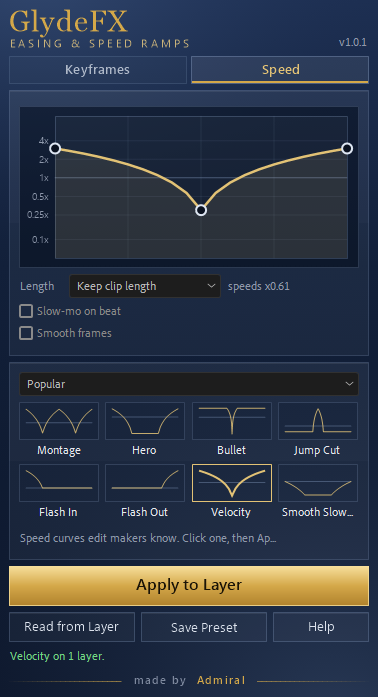
GlydeFX, Speed tab: the Velocity speed curve applied to one layer
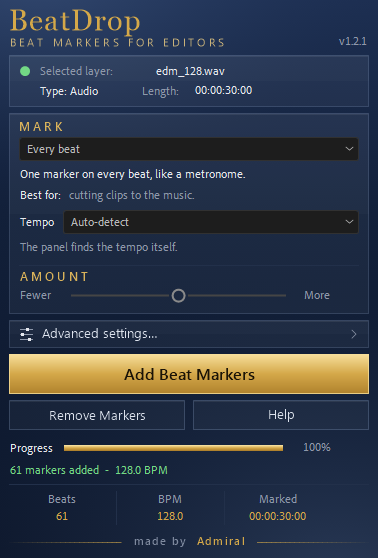
BeatDrop after a run: 61 markers added at 128 BPM
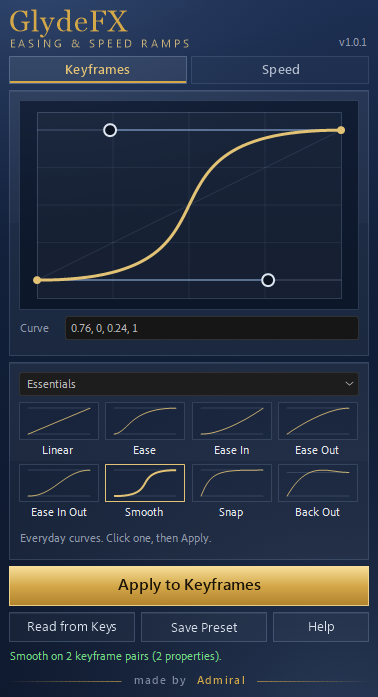
GlydeFX, Keyframes tab: the Smooth curve applied to two keyframe pairs

Free tools

Two panels, one job each.

Every picture on this page is the real panel in After Effects 24.6, cropped from the screen and nothing added.

The BeatDrop panel after marking a 30-second track: 61 beats at 128 BPM
After one click on a 30-second track.
BeatDropBeat markers for editors

Select your music layer, pick what to mark, click once. Markers land on the beat or on the hits you choose.

  • Every beat for cutting clips to the music, like a metronome.
  • Kick & bass, snare & clap, hi-hats or every hit, for zooms, flashes and text pops.
  • Amount sets how many markers you get; Tempo follows the song, halves, doubles or takes an exact BPM.
  • Holds up on long edits: a 30-minute track took about 2.5 minutes in After Effects.
  • Remove Markers deletes only the markers BeatDrop made. Yours stay.
Version
1.2.1
Needs
After Effects 2022+
File
287 KB, one .jsx

SHA-256 3aab7fa4b937e2813af8620b2825b74f522ec6475518609620af32907dc98f6d

GlydeFXEasing & speed ramps

One curve editor, two tabs: shape how keyframes move, or shape how fast a clip plays.

  • Keyframes: Essentials, the classic easings, Edit and Zoom curves, or drag the two handles. Paste CSS cubic-bezier numbers straight in.
  • Speed: Montage, Hero, Velocity, Micro and more, written to Time Remap with one key per point.
  • Slow-mo on beat puts the slow part on the nearest marker, like the ones BeatDrop adds.
  • Eight places for your own curves in each tab, and every Apply is one undo step.
Version
1.0.1
Needs
After Effects 2022+
File
276 KB, one .jsx

SHA-256 f9dd3690ca2937423ad154115356a2a565dc416d6e30fff315c33aeb4fb0cd50

GlydeFX Keyframes tab with the Smooth easing curve
Keyframes: the Smooth curve on two keyframe pairs.
GlydeFX Speed tab with the Velocity speed ramp
Speed: Velocity on a precomp layer.
GradeFXColor looks

A grid of color looks, each one shown on the same photo, so you can compare them side by side and put one on your layer with a click. It is in testing now.

Coming next

Packs

The first pack is being made.

Packs will be paid, and each will show exactly what is inside, which apps and versions it works in, and real before-and-after clips. These are the kinds planned:

After Effects

Color packs

Grades built and checked on real footage.

After Effects

Transitions

Cuts, zooms and shakes for edits.

After Effects

Text

Titles and lyric animations.

CapCut

Templates

The same looks for phone editing.

Want to hear when it is out? Discord Instagram

Install

One file, three steps.

Download the .jsx

Click Download on the tool above. It is a single file, Admiral_BeatDrop.jsx or Admiral_GlydeFX.jsx.

Install it in After Effects

File › Scripts › Install ScriptUI Panel..., choose the file, then restart After Effects.

Open it from Window

The panel is at the bottom of the Window menu, under its file name. Dock it wherever you like.

Or copy the file by hand into the ScriptUI Panels folder (Windows asks for administrator permission there):

C:\Program Files\Adobe\Adobe After Effects <version>\Support Files\Scripts\ScriptUI Panels\

Tested on Windows 11 with After Effects 2024 (24.6). macOS has not been tested yet; if you try it there, tell me how it went.


Questions

Before you download.

Are the tools really free?

Yes. BeatDrop and GlydeFX are free and open source under the GPL-3.0 licence. There is no trial, no account and no license key. The packs will be the paid part.

Do they send anything online?

No. They make no network connection. They keep their settings and your own presets in After Effects' preferences.

Which After Effects do I need?

After Effects 2022 or newer. They are tested on Windows 11 with After Effects 2024 (24.6) in English.

Can I undo what a panel did?

Yes. Every click of Apply or Add Beat Markers is one undo step, and Remove Markers takes away only what BeatDrop added.

How do I know the file is the real one?

Compare its SHA-256 with the one shown under the tool, or with SHA256SUMS.txt in the GitHub release. In PowerShell: Get-FileHash Admiral_BeatDrop.jsx

I found a bug or have an idea.

Tell me on Discord, by e-mail, or open an issue on the tool's GitHub page.


Contact

Find me here.